
Amarans
0218 CSS - | Box | Color | Font | 본문
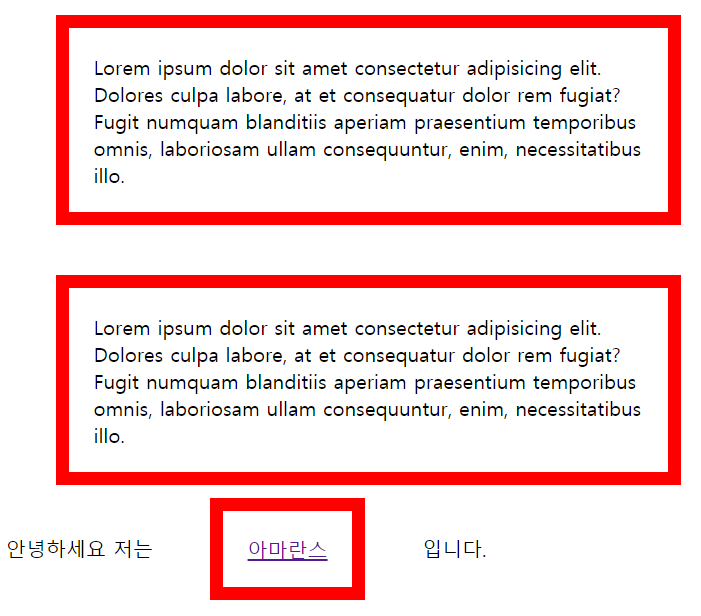
<!DOCTYPE html>
<html>
    <meta charset="utf-8">
<head>
    <style>
        p,a{
            border: 10px solid red;
            padding: 20px;
            margin: 40px;
            width: 500px;
            box-sizing: border-box;
        }
    </style>
</head>
<body>

     <p>
       Lorem ipsum dolor sit amet consectetur adipisicing elit.
       Dolores culpa labore, at et consequatur dolor rem fugiat?
       Fugit numquam blanditiis aperiam praesentium temporibus omnis,
        laboriosam ullam consequuntur, enim, necessitatibus illo.
     </p>
     <p>
        Lorem ipsum dolor sit amet consectetur adipisicing elit.
        Dolores culpa labore, at et consequatur dolor rem fugiat?
        Fugit numquam blanditiis aperiam praesentium temporibus omnis,
         laboriosam ullam consequuntur, enim, necessitatibus illo.
     </p>
     안녕하세요 저는 <a href="https://amarans.tistory.com/">아마란스</a> 입니다.

</body>
</html>
<!DOCTYPE html>
<html>
<style>
div {height:50px;width:100%;}
</style>
<body>

<h1>색</h1>

<div style="background-color:rgb(255,0,0)"></div>
<div style="background-color:rgb(255,255,0)"></div>
<div style="background-color:rgb(0,255,0)"></div>
<div style="background-color:rgb(0,255,255)"></div>
<div style="background-color:rgb(0,0,255)"></div>

<h1 style="color:rgb(255,0,0)">Heading</h1>
<h1 style="color:rgb(255,255,0)">Heading</h1>
<h1 style="color:rgb(0,255,0)">Heading</h1>
<h1 style="color:rgb(0,255,255)">Heading</h1>
<h1 style="color:rgb(0,0,255)">Heading</h1>

</body>
</html>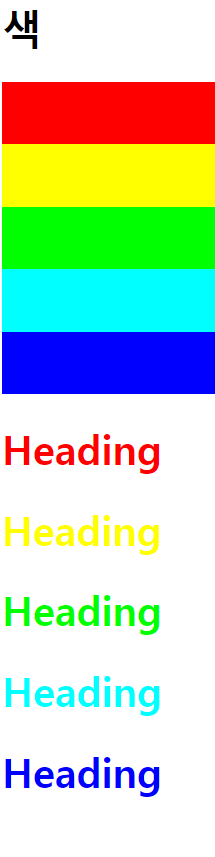
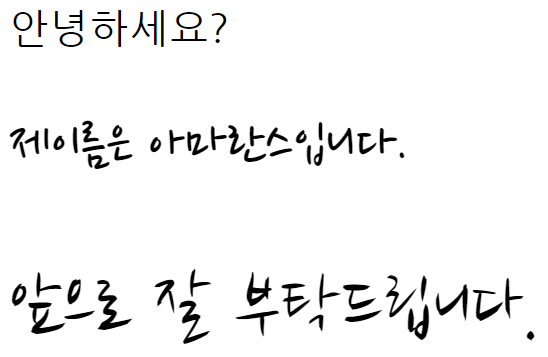
<!DOCTYPE html>
<html>
<head>
    <link href="https://fonts.googleapis.com/css?family=Nanum+Brush+Script|Nanum+Gothic+Coding|Nanum+Pen+Script&display=swap" rel="stylesheet">
    <style>
        #font1{
            font-size: 2rem;
            font-family: 'Nanum Gothic Coding', monospace;
        }
        #font21{
            font-size: 3rem;
            font-family: 'Nanum Pen Script', cursive;
        }
        #font33{
            font-size: 4rem;
            font-family: 'Nanum Brush Script', cursive;
        }

    </style>
</head>
<body>
   <p id="font1"> 안녕하세요?</p>
   <p id="font21">  제이름은 아마란스입니다.</p>
   <p id="font33">  앞으로 잘 부탁드립니다.</p>

</body>
</html>
font-weight
폰트의 두께를 나타냅니다. 대체로 bold만 기억하시면 됩니다. bold를 사용하면 폰트가 두껍게 표시됩니다.
line-height
행과 행 사이의 간격을 지정합니다. 기본 값은 normal로 수치로는 1.2에 해당합니다. 이 수치를 기준으로 간격을 조정하면 됩니다. 값이 1.2라면 현재 엘리먼트 폰트 크기의 1.2배만큼 간격을 준다는 의미입니다.
참고 사이트 : http://matchwebdesign.com/Daily-Thoughts/why-typographically-thinking-ruins-your-site.html
-----------------------------------------------------------------------------------------------------------------------------------
'CSS' 카테고리의 다른 글
| 0219 | Column | Background | (0) | 2020.02.19 |
|---|---|
| 0219 Flot | holy_grail_layout (0) | 2020.02.19 |
| 0219 Flex | grow&shrink | holy_grail_layout (0) | 2020.02.19 |
| 0218 CSS| Position | text_align | (0) | 2020.02.19 |
| 0217_CSS | Parent_child_selector | tag (0) | 2020.02.19 |
'CSS' Related Articles
more


Comments